Showing posts with label camera. Show all posts

Thursday, October 18, 2012

iPhone Camera Tips

Have an iPhone and love the fact that you have a camera at the ready almost always now? Here are some short tips to make taking an excellent photo even easier:

Tap to focus- Yes, the iPhone does auto-focus, but what if you just can't get it to focus where you want? Often times, I use it to adjust where it's adjusting for the light. Photo too dark? Tap on an area of the photo that's particularly bright. Too bright? Just the opposite. Need to focus on a something far away or particularly close? Simply tap on it and the iPhone will adjust the focus on it.

Grid- When you have the camera opened on your iPhone, under "Options" you'll see the choice to turn on a grid. This can help you make sure your horizon line is straight or that the walls in your photo aren't distractingly lopsided. It's also used for what art students refer to as the "rule of thirds." The idea is pretty simple- a piece of art is more interesting to the eye if the main contents of the photo are in fact NOT centered, but rather slightly off-center. Look at the example below. The man is laying along the bottom line and the upper limit of the items in the yard is along the top line.


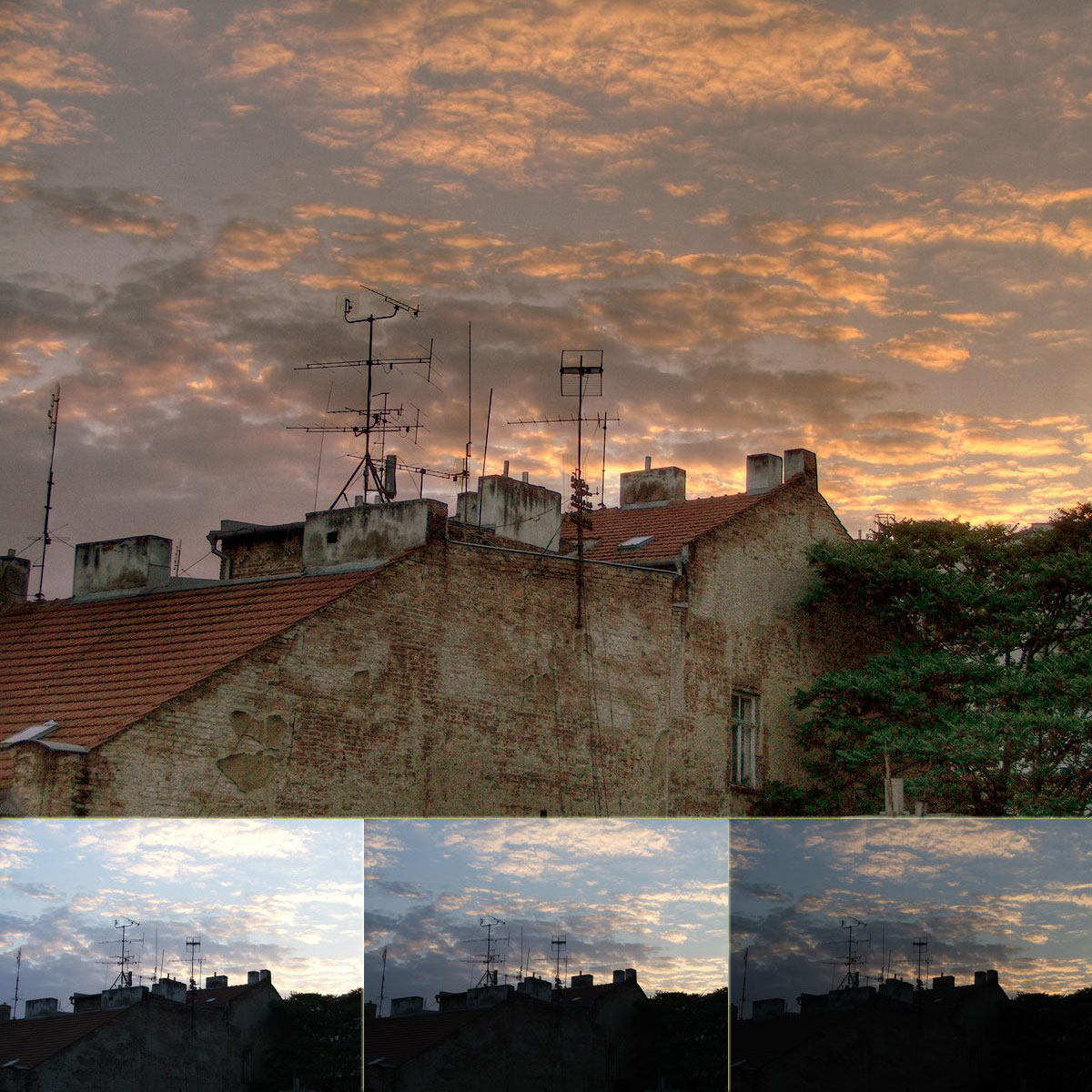
HDR- The other option in the "Options" section is HDR. HDR stands for "high dynamic range," but don't worry if you forget that shortly- I doubt anyone will quiz you on this. What HDR does is take three photos right after another. One is over-exposed (too bright), one under-exposed (too dark) and one is normal. Then, the iPhone lays the photos over each other and the result is a photo that shows more detail in areas that would otherwise be too dark or too bright to see them in. See the photo below as an example.

Practical Tip of the Day:
Tired of just missing the perfect moment? You can actually hold down the camera icon, adjust the position of the camera as you'd like and then let up on the icon. The iPhone won't actually take the photo until your finger comes up from the icon.

Thursday, March 8, 2012

Should I Get The New iPad?

Yesterday Apple announced the third generation of the iPad. Immediately, people began asking whether they should get it or not. Here's a quick breakdown of the new/improved features:

Screen- Higher resolution. This means your pictures, movies and even your webpages and books will look crisper and sharper.

Processor- They've used a quad-core graphics processor. This means this iPad is significantly faster than the previous version. This primarily comes across when running applications.

4G- Certain models of the iPad can use a cell phone carrier's 4G network. This means that you can access the Internet when you're not in a wireless hotspot, and if you're in an area with 4G your webpages, YouTube videos, etc. will load faster.

Camera- They've increased the quality of the camera so now it can take 5 megapixel pictures (pretty good), and record HD video.

Now, does all of this add up to needing a new iPad? If you only use your iPad for checking your email and occasionally playing games, probably not. If you've been thinking about getting an iPad, or you have a tablet that's too slow or doesn't meet your needs I'd recommend taking a look at them.
Practical Tip of the Day:
If you aren't one of the people who feels the need to have the newest product all the time, you can save quite a bit of money by buying the previous generation (aka version) of a product. Often times companies who sell the product will put the older versions on sale, and individual people put their used products on sale on websites like eBay and Craigslist. Buyer beware on purchasing from individuals though- "good condition" is subjective and may mean different things for the seller and buyer.