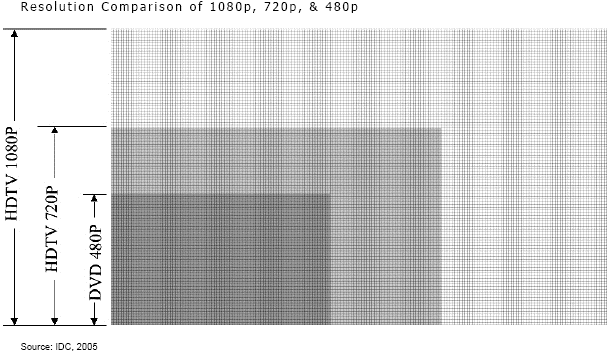
In the above picture, we see three different descriptions on the left hand side. DVD 480P, HDTV 720P and HDTV 1080P. To the right of those we see lots of lines and various shading. The smallest box (the one with the darkest shading) corresponds with DVD 480P (or 480p for short). This is the resolution of a standard definition (read: "normal") TV. What does resolution mean, you ask? See how the boxes are made up of lots of lines going both up and down as well and left and right? Each spot where one of those lines intersects another is where a pixel would be on your screen. Resolution is simply how many pixels make up the picture you see. The more pixels, the higher resolution, and the crisper the image looks.
So, the numbers. 480,720, 1080. These are the number of horizontal lines on the screen. See how the boxes above get bigger with the higher number resolution? That's because they have more lines they need to fit in. Most TVs nowadays are widescreen, meaning they have a 16:9 aspect ratio. This simply means that for every 9 horizontal lines, there are 16 vertical lines, hence giving the widescreen it's distinctive long look instead of the squarer look of a standard aspect ratio. Now, you've probably already noticed that most TVs will come in either a 720 or a 1080 ratio in the same size. That's where the difference between the two really come in. In a TV with 1080, they squeeze 360 more horizontal (and therefore 640 more vertical) lines in the same physical space. This is what makes a picture look "sharper" in a higher resolution.
As to what the "p" means, this is as opposed to "i" which is an increasingly less common standard to see. The P stands for "progressive scan" as opposed to the I which stands for "interlaced video." Interlaced video is called such because when an image is displayed on the screen, every other line is put up on the screen first, and then filled in. Of course, this happens quickly so it's not incredibly obvious, but if you'd like to see an example, Wikipedia has a nice one right here. Progressive scan means that all the lines are put up in their sequential order, so you don't have the jumpy look of interlaced video.
Practical Tip of the Day:
While all this information makes you think that getting the highest resolution is obviously the best choice, first consider what you'll be watching on your HDTV. For example, my husband and I don't have cable. We primarily watch Netflix and Hulu from our Xbox. This means that the video we get from these sources is 720p. Even if we had a 1080p TV, the video itself is only 720, so it'd display as such. Getting a higher resolution TV won't make your videos look better than they are, but it'll make sure they look as good as they can. An analogy I use is if you have an old photo from the 1940s. Even if you scan it and print it out larger it won't be clearer because the original photo just didn't have more detail in it.

